Verify
Not just compiled. Proven.
Most migration tools stop when the file parses. CodeMorph checks the whole project: your type checker, your test suite and your build. Failures go back into a repair loop, and a migration is only verified when all three pass.
Definition
What “verified” means
A precise, checkable bar. No vibes, no confidence scores.
0
type errors
tsc --noEmit across the whole project, against your own tsconfig.json.
100%
of your tests pass
Your existing test command, run exactly as your package.json defines it.
1
clean build
Your build script runs too, so what you ship is what was checked.
These are the pass criteria Verify enforces, not results from a benchmark.
The loop
Convert, check, repair
Errors are information. CodeMorph uses them.
- 01
Record a baseline
tsc --checkJsBefore anything changes, CodeMorph measures how many type errors your JavaScript already has. Progress is measured against reality. - 02
Convert the batch
Each file is converted with its already-typed dependencies in context. - 03
Type-check
tsc --noEmitThe whole project is checked, not just the new files, so a change that breaks a dependent file is caught immediately. - 04
Repair
bounded attemptsCompiler errors go back to the model with the exact diagnostics attached. If a file still fails after a few attempts, it's flagged for your review instead of being forced through with any. - 05
Run your tests
Jest or VitestYour suite runs unchanged. A batch that type-checks but breaks behavior is not verified. - 06
Build
npm run buildYour build script runs last, so the code you ship is the code that was checked.
[codemorph] baseline: tsc --checkJs · 1,879 errors in 38 files
[codemorph] batch 1/4 · lib/ utilities
[codemorph] lib/db.ts      · tsc 0 errors · 0 repairs
[codemorph] lib/logger.ts  · tsc 0 errors · 1 repair
[codemorph] lib/mailer.ts  · tsc 0 errors · 0 repairs
[codemorph] batch 1 · npm test · 48 passed
[codemorph] batch 1 verified
Details
Built around your toolchain
Your tsconfig, respected
Your test runner
No silent any
Runs locally
Step 1
Typecheck
tsc --noEmit across the whole project, against your own tsconfig.json.
The typecheck runs the TypeScript compiler you already depend on, with your configuration, and reports the error count. Zero is the only passing result. It covers every file in the project, including JavaScript that hasn't been converted yet, because a change to a typed module can break the files that import it.
// lib/money.ts (just converted)
export function money(cents: number): string {
  return "$" + (cents / 100).toFixed(2);
}

// api/orders.js (still JavaScript, not in this batch)
const { money } = require("../lib/money");
money(order.total.toString());
//    ^ tsc --checkJs: Argument of type 'string' is not assignable
//      to parameter of type 'number'.
Checking only the converted file would have passed. Checking the project catches the caller that now passes the wrong type.
Step 2
Test suite
Your test script, exactly as package.json defines it.
Types prove the code is consistent. They don't prove it's correct. A function annotated to return a string that really returns undefined on one path will type-check happily if every caller trusts the annotation. Your tests are the closest thing your project has to a specification, so they decide whether behavior survived the migration.
CodeMorph runs the test script from your package.json, so Jest, Vitest, Mocha, node:test or anything else works unchanged. The result shows the number of tests that passed.
Step 3
Build
Your build script, so what you ship is what was checked.
Bundlers and frameworks have their own rules on top of TypeScript: Next.js page conventions, Vite plugins, path aliases configured in the bundler rather than tsconfig. Running the build script catches anything the typecheck and tests miss, before it reaches your CI or your users.
Results
Reading the Verify tab
| You see | It means |
|---|---|
| A spinner next to a step | That step is running now. Steps run in order: Typecheck, Test suite, Build. |
| A check and “0 errors” | The typecheck passed across the whole project. |
| A check and “48 passed” | Your test script passed, with the number of tests it reported. |
| A check and “ok” | Your build script completed successfully. |
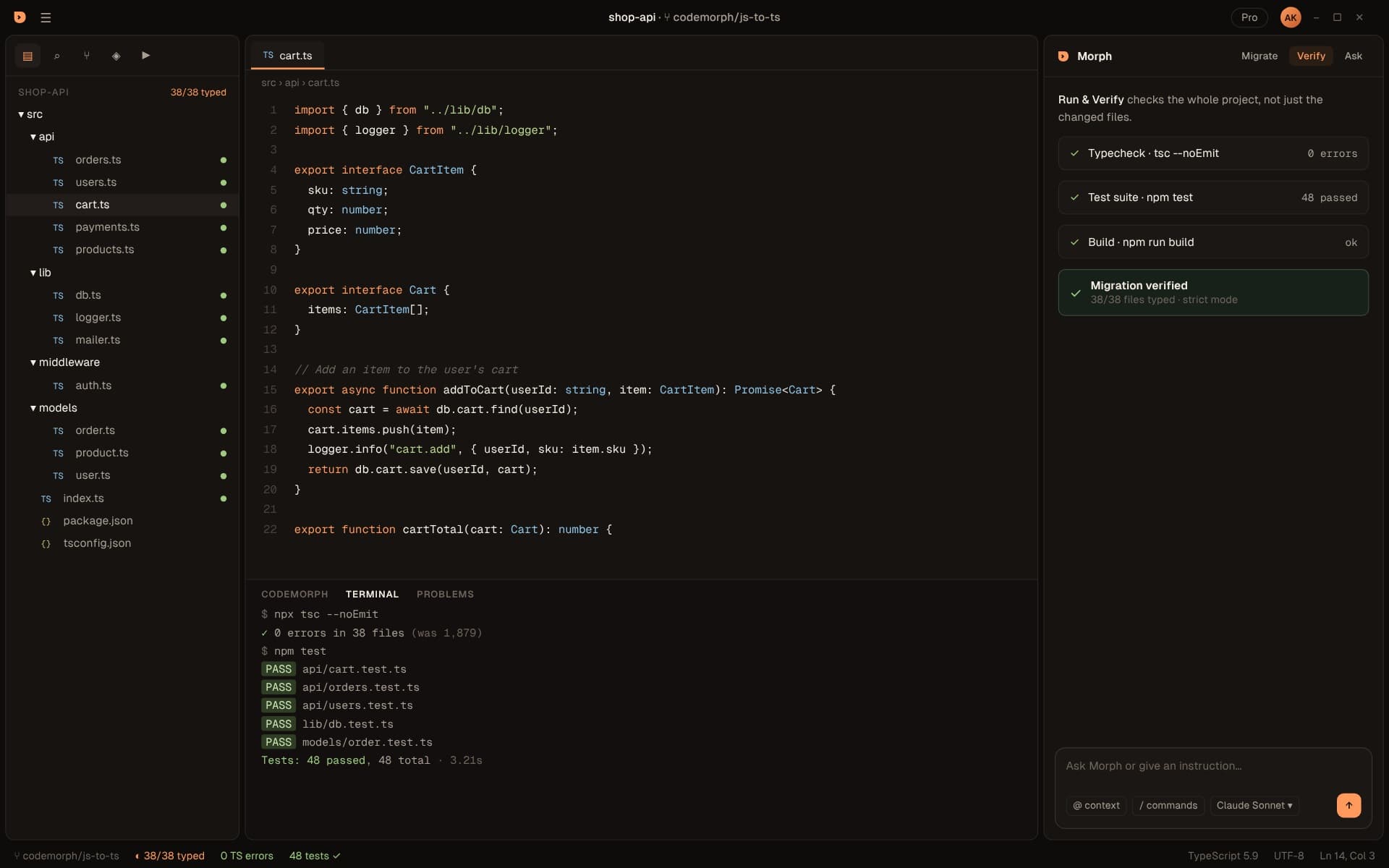
| Migration verified | All three steps passed. The card shows your typed-file count and strictness, such as 38/38 files typed, strict mode. |
| A failed step | Verification stops there. Open the failing file or test, or ask Morph about the error in the Ask tab. |
Strictness
Choose your bar
Verify holds the project to whatever your tsconfig.json says. Raise it when you're ready.
Loose
Incremental
Strict
Not sure where to start? Read Turning on strict mode without drowning in errors.
In the editor
Run it any time
One shortcut
Ctrl+Shift+V. Run & Verify checks the whole project, not just the changed files, and shows each step as it runs: Typecheck, Test suite, Build. When all three pass you'll see Migration verified, with your typed-file count. See the Verify docs.What if my project has no tests?
Which commands does it run?
Is my code sent anywhere to be verified?
Can I run Verify without migrating anything?
Does Verify need an API key?
What about projects that use a bundler instead of tsc?
How long does Verify take?
What's the baseline for?
Ship TypeScript you can prove.
Download the beta, open a project and see your migration plan in under a minute.