Skip to content
CodeMorph

Download CodeMorph

Free to download. Sign in for CodeMorph AI, or bring your own API key.

Changelog

What's new in CodeMorph

Every release and pre-release build, newest first. Written by the people who built it.

RSS
  1. v0.2.0Beta

    Accounts, Pro, CodeMorph AI and Morph Agent

    Free and Pro plans, sign-in with GitHub, Google or an email link, CodeMorph AI for migrations, migrations that finish with a type check and a scoped commit, and Morph Agent in a redesigned Morph panel. For Windows and for Mac, on both Apple Silicon and Intel.

    Beta 0.2.0 is available for Windows x64 and for Mac, on both Apple Silicon and Intel. Download it.

    Free and Pro plans

    CodeMorph now comes in two plans. See Pricing.

    • Free: 100 accepted files a month with your own AI key, and Morph Agent in Ask mode.
    • Pro, $20 a month: unlimited files, Morph Agent in Edit and Plan modes, a second AI model that reviews each change, and a monthly CodeMorph AI allowance.

    A file counts when you accept it. If you undo it, you get it back.

    Your account, one click away

    A Sign in button sits at the top right of every window. Sign in from the app in your browser, with GitHub, Google or a link sent to your email. No password. Your browser confirms you're signed in and you go back to CodeMorph.

    Once you're signed in, the button shows your initial and your plan. Click it to see your email, your plan and how much CodeMorph AI you've used this period, and to manage your account, see billing and invoices, upgrade to Pro or sign out. Your plan keeps working offline for up to 7 days after the last check.

    The first time you open CodeMorph, a short welcome screen lets you sign in or carry on without an account.

    CodeMorph AI

    • Migrate files with CodeMorph AI, no API key needed. Sign in to try it free on 20 files; Pro includes a monthly allowance.
    • When you're signed in and haven't set up another provider, migrations use CodeMorph AI on their own.
    • The status bar shows how much of your allowance you've used.
    • Clearer limit messages with options that fit your plan. If you reach a limit partway through a step, CodeMorph finishes that step first and tells you when the limit resets.
    • CodeMorph AI does not store your code, your prompts or the AI's answers.

    Migrations that finish cleanly

    • The type check runs on its own when a migration ends, so the summary shows the real result.
    • Finish migration closes a run with a short summary: files migrated, the type check result, time taken and cost.
    • Commit the changes from that summary. Only this run's files go into the commit, and you confirm the message first.
    • Recent runs on the Migrate home keep each run's report and Undo all one click away.
    • The summary and the report show what each run and each file cost. Amounts under a cent show as <$0.01.

    Morph Agent, in a redesigned Morph panel

    A coding assistant in the Morph panel that knows your project. See Morph Agent.

    • Ask (Free and Pro): answers questions about your code and proposes changes for you to accept.
    • Edit (Pro): writes changes, and you can undo them any time.
    • Plan (Pro): investigates and writes a plan, and changes nothing.

    The panel is calmer and easier to use. Choose CodeMorph AI, your own API key or a local model. What you send shows as small chips above the message box. File and line references in answers are clickable citations: they open the file at the right line and highlight it. Type @ to add a file or folder, start a new conversation at any time, and reopen earlier ones from History. Ask also sees the errors and warnings the editor shows for those files.

    Every change goes through the diff review, and commands always ask before they run.

    More AI providers

    Use your own key with Anthropic, OpenAI, Google Gemini or OpenRouter, or run a local model with Ollama, for migrations and for Morph Agent.

    Chat with Claude Code

    If you already use Claude Code, you can chat with it in the Morph panel. It runs under your own Anthropic account, and CodeMorph never sees your sign-in. It is off until you turn it on in Settings, and needs Claude Code 2.1.234 or later.

    Notices from CodeMorph

    CodeMorph can now show a short notice from codemorph.codes, such as news about a release, and tell you when your version is too old to keep using its AI features. Your editor and your files always keep working. If CodeMorph can't reach us, nothing changes.

    Fixes and safety

    • Type checks you can trust. Projects that use CommonJS now get the right TypeScript settings, and a problem in the TypeScript settings stops the check instead of letting it pass quietly. Earlier runs affected by this are marked "not verified" so you can check them again. This fixes the known issue in 0.1.1.
    • Safer extension installs. CodeMorph refuses extension versions that are known to be harmful, including two bad builds of a popular extension reported on 29 October.
    • The Morph panel fits its space. It no longer runs over the status bar.

    Updating on a Mac

    After you update from 0.1.1, macOS asks once whether CodeMorph can use its keychain item, "CodeMorph Safe Storage". Click Always Allow. CodeMorph keeps your API keys and your sign-in there; if you click Deny, it can't read them until you allow it.

    Notes

    • Installers aren't signed with an Apple or Microsoft certificate yet, so your computer asks you to confirm the first time. See the Windows install guide and the Mac install guide.
    • Each download has a SHA-256 checksum so you can check the file.
  2. v0.1.1Beta

    Claude Code, verified extensions and opt-in usage stats

    A smaller Windows installer, Claude Code installable from Open VSX, verified extension downloads, opt-in anonymous usage statistics and Claude Agent (experimental, off by default).

    Beta 0.1.1 is available for Windows x64 and for Mac, on both Apple Silicon and Intel.

    Smaller Windows installer

    The Windows installer is smaller.

    Claude Code from Open VSX

    Anthropic's Claude Code extension installs from the Extensions view like any other extension. CodeMorph never sees, stores or asks for your Claude sign-in, and the Morph panel opens beside it. See Extensions.

    Verified extension downloads

    Extensions you install from Open VSX are now checked against the SHA-256 checksum Open VSX publishes. If the check can't be completed, the install fails instead of continuing.

    Opt-in anonymous usage stats

    The first time you open CodeMorph it asks whether to share anonymous usage statistics. Closing the dialog means no, and nothing is sent unless you agree. If you do, the app sends counts and yes/no facts, such as how many files were converted and accepted, under a random install ID. It never sends code, file contents, file names, paths, project names, prompts, model output or API keys. Change your choice any time in Settings with CodeMorph: Share Anonymous Stats. The details are in the privacy policy.

    Claude Agent (experimental, off by default)

    Claude Agent lets you chat with your own Claude Code inside the Morph panel. It is off until you turn it on in Settings, under CodeMorph: Claude Agent (experimental). It uses the Claude Code installed on your computer and your own API key or Console account. Every file change and every command waits for your approval, and nothing is written until you accept.

    Known issue: type checking in plain CommonJS projects

    Who's affected: Node projects that use CommonJS (require) with no bundler and no "type": "module" in package.json, where CodeMorph created the tsconfig.json.

    What happens: the tsconfig.json that 0.1.1 proposes uses a setting TypeScript no longer accepts. TypeScript then checks no files, but the step can still show as passed and "No new type errors". In Auto modes, files with type errors can be accepted.

    Workaround: in tsconfig.json, set "module" and "moduleResolution" to "NodeNext", then click Check types again in the same migration run, before starting a new one. Set both: changing only one is still a settings error. Files accepted before the fix then show their real type errors. A new run would count those errors as existing, not new.

    Fixed in 0.1.2: CodeMorph proposes NodeNext for these projects, and a type check that can't run shows as failed instead of passed.

    Notes

    • Installers are unsigned, so SmartScreen warns on first run.
  3. v0.1.0Beta

    Scan & Plan and the Morph panel

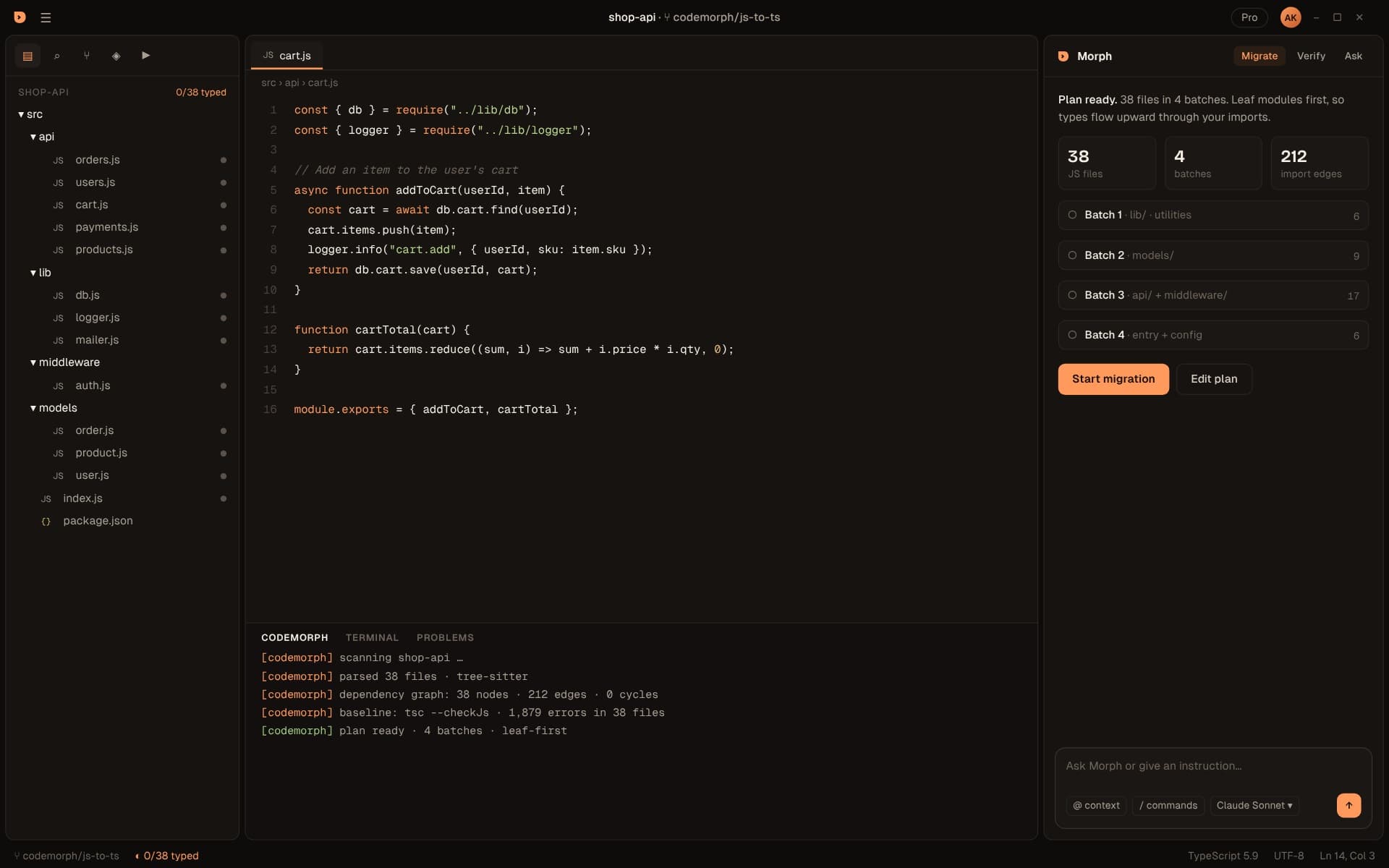
    The first public beta. CodeMorph can now scan a JavaScript project, build its dependency graph and plan a leaf-first migration to TypeScript.

    The first public beta of CodeMorph is out for Windows. This is the release where the editor stops being a rebranded shell and starts understanding your code.

    Scan & Plan building a dependency graph

    Scan & Plan

    • Dependency graph. CodeMorph parses every .js, .jsx, .mjs, .cjs, .ts and .tsx file with tree-sitter and resolves every import: relative paths, index files, tsconfig and jsconfig path aliases, barrels, re-export chains, CommonJS and dynamic import().
    • Import classification. Each edge is recorded as a local file, Node built-in, package, asset or unresolved, so gaps in the graph are visible instead of silent.
    • Leaf-first batches. Files are ordered with Tarjan's strongly connected components algorithm, so every file comes after its dependencies and circular groups always stay together. Components are packed into batches of about ten files.
    • Local graph store. The graph lives in a local SQLite database. Nothing leaves your machine.
    • Respects .gitignore. Including nested .gitignore files, so node_modules and build output stay out.

    Morph panel

    • New Morph panel in the secondary sidebar with Migrate and Verify tabs. Ask is coming soon.
    • Ctrl L opens Morph, overriding expand-line-selection the way other AI editors do.
    • Ctrl Shift M runs Start Migration from anywhere.
    • Morph's open or closed state is remembered per project.

    In the editor

    • Explorer status dots. Grey for JavaScript that hasn't been migrated, green for files that are already TypeScript.
    • Typed counter. The status bar shows typed files out of total, and opens Morph on click.
    • CodeMorph: Set API Key stores your Anthropic key in secret storage, never in settings.json.
    • New settings codemorph.ai.provider (anthropic or ollama) and codemorph.ai.model.
    • The Welcome page layout now adapts to narrow windows.

    Notes

    • Installers are unsigned, so SmartScreen warns on first run.
    • Windows x64 only.
  4. Pre-release

    Windows インストーラー、Welcome ページ、最初の Morph UI

    CodeMorph に本格的な Windows インストーラー、Welcome ページから始まる起動、そして Morph パネルとタイトルバーの最初のバージョンが加わりました。

    Windows インストーラー

    • ユーザー用とシステム用のインストーラー、およびポータブル版の .zip を、バージョンタグごとに CI でビルドし、GitHub Releases に添付します。
    • ブランド化されたインストーラー:CodeMorph のライセンスページ、ウィザードのアートワーク、CodeMorph のバージョン番号を含むファイル名。
    • About ダイアログは CodeMorph のみを説明するようになりました。
    • コード署名はオプトインのステップとして組み込み済みで、証明書が用意できればすぐに使えます。

    Welcome ページから開始

    • CodeMorph は起動時に必ず Welcome ページを開くようになりました。ウォークスルーに飛ぶ代わりに、Open Folder、Start Migration、最近のプロジェクトを表示します。
    • 入門用のウォークスルーは必要なときに開けます。クリックできるツアーのサムネイルも用意しました。
    • 起動時に一瞬違うテーマが表示される問題を修正しました。
    • Welcome ページ全体で余白、配置、ホバー状態を調整しました。

    Morph パネルとタイトルバー

    • セカンダリサイドバーに Morph パネルの最初のバージョンを追加しました。
    • タイトルバーにプロジェクト名とブランチ、プランのピル表示、アバター用の枠が加わりました。
    • パネルの間隔、角丸、タイトルバーのコントロールを全体的に磨き込みました。

    ビルドの安定性

    • Windows ビルドを VS 2022 ツールチェーンに固定し、インストールの並列数に上限を設けて、不安定な CI の失敗をなくしました。
    • デスクトップビルドでフォントが正しく同梱されるようになりました。
  5. Pre-release

    CodeMorph 独自のアイデンティティ

    クリーンな土台と、Geist、Bricolage Grotesque、温かみのあるダークテーマを軸にしたビジュアルアイデンティティ。

    クリーンな土台

    • Morph は組み込みのエージェントです。 サードパーティ製の AI アシスタントはエディターに同梱されていません。
    • 全体を CodeMorph ブランドに統一し、CI の自動チェックで一貫性を保っています。
    • プライバシーに関する最新の説明は、英語版のプライバシーポリシーをご覧ください。
    • 拡張機能レジストリには Open VSX を使用します。
    • 設定のデフォルト値を修正し、新規インストール時に CodeMorph が選んだデフォルトが実際に適用されるようにしました。

    ビジュアルアイデンティティ

    • フォント:インターフェースには Geist、エディターには Geist Mono、見出しには Bricolage Grotesque を使用します。いずれも同梱済みでオープンソースです。
    • CodeMorph テーマをデフォルトに:温かみのある黒に近いサーフェスに、オレンジのアクセントを組み合わせています。
    • フローティングパネル:ボーダーのないカードで、間隔と角丸を統一しました。タブストリップ、ステータスバー、スクロールバーも作り直しています。
    • CodeMorph のしずくマークをタイトルバーと、空のエディターの透かしに表示します。CI でチェックサムを検証しているため、誤って変更されることはありません。
    • 空のエディターには主要なアクションを一覧表示します:Start Migration、Run & Verify、New Agent Chat、Open Folder、Show Terminal、Search Files。
  6. Pre-release

    初日

    CodeMorph エディターのリポジトリを作成し、CI で Windows インストーラーをビルドするようにしました。

    CodeMorph は小さく再現可能なビルドから始まりました。ブランディング、名前を付けた少数の変更点、そしてタグ付きのソースからインストーラーを生成する CI パイプラインです。

    • 再現可能なエディタービルドの雛形を作成しました。
    • CodeMorph のアイコンセットを追加しました。2 つのソースファイルからすべてのサイズを生成します。
    • バージョンタグごとに Windows インストーラーをビルドする CI を構築しました。
    • 改行コードとツールチェーンのバージョンを固定し、マシンが変わってもビルドが再現できるようにしました。