Migrate
A migration plan built from your real dependency graph.
CodeMorph reads every file, resolves every import and orders the work so each file is typed against dependencies that are already TypeScript. No guessing at shapes the model can't see.
Step 1 · Scan
The dependency graph
Scanning runs entirely on your machine and takes seconds on most projects.
Parsed, not pattern-matched
Resolved like your toolchain
Every edge classified
Stored locally
// ES modules, including re-exports and namespace imports
import { db } from "../lib/db";
import * as money from "@/utils/money";      // tsconfig / jsconfig paths
export { hashPassword } from "./crypto";
export * from "./models";                     // barrels

// CommonJS, destructured or not
const { logger } = require("../lib/logger");
module.exports = { addToCart, cartTotal };

// Dynamic imports are recorded and flagged as dynamic
const report = await import("./reports/monthly");
The scan respects your .gitignore chain, so build output and node_modules never enter the graph.
Resolution rules
How every import is resolved
The resolver is deterministic: the same project always produces the same graph, and the first match wins.
- 01
Path aliases
tsconfig or jsconfigIf the specifier matches compilerOptions.paths, it's rewritten against baseUrl before anything else. - 02
Exact path
The specifier is tried exactly as written, relative to the importing file. - 03
Extension probing
.ts, .tsx, .js, .jsx, .mjs, .cjsThen each extension in that fixed order, so a migrated file is preferred over its JavaScript original. - 04
Index files
Then the same extensions under /index, so ./utils resolves to utils/index.js. - 05
TypeScript-style specifiers
NodeNextAn import of ./dep.js also matches dep.ts or dep.tsx, .mjs matches .mts and .cjs matches .cts, the way TypeScript's NodeNext resolution works. - 06
Classification
Anything that isn't a local file is classified as a Node built-in, a package declared in package.json, an asset such as CSS or JSON, or unresolved with a reason.
What's recorded
A graph you can query
The scan stores more than a list of imports. This is what makes good ordering and good answers possible.
| Record | What it captures |
|---|---|
| Files | Path, language, lines of code, a content hash, and whether it's a test file, an entry point or has syntax errors |
| Symbols | Every declaration with its kind, line range and whether and how it's exported |
| Edges | Each import or re-export, with flags for dynamic, type-only, side-effect-only and re-export |
| Edge symbols | Exactly which names each import pulls in, and what they're exposed as |
| Packages | Dependencies declared in package.json, with versions |
| Unresolved | Imports that couldn't be resolved, with the reason: not found, or a package missing from package.json |
Stored in a local SQLite database. Nothing in it leaves your machine.
Step 2 · Plan
Leaf-first batches
Types flow upward through imports. So the plan starts at the leaves.
- 01
Find strongly connected components
Tarjan's algorithmFiles that import each other in a cycle form one component. A cycle is never split across batches, because its files can only be typed together. - 02
Order components topologically
dependencies firstA component closes only after everything it imports has closed, which gives a leaf-first order for free: utilities, then models, then routes, then your entry point. - 03
Group into batches
about 10 files eachComponents are packed into batches of roughly ten files for pacing and review. Batch size is presentation, not correctness: the order underneath never changes. - 04
Show the plan before anything runs
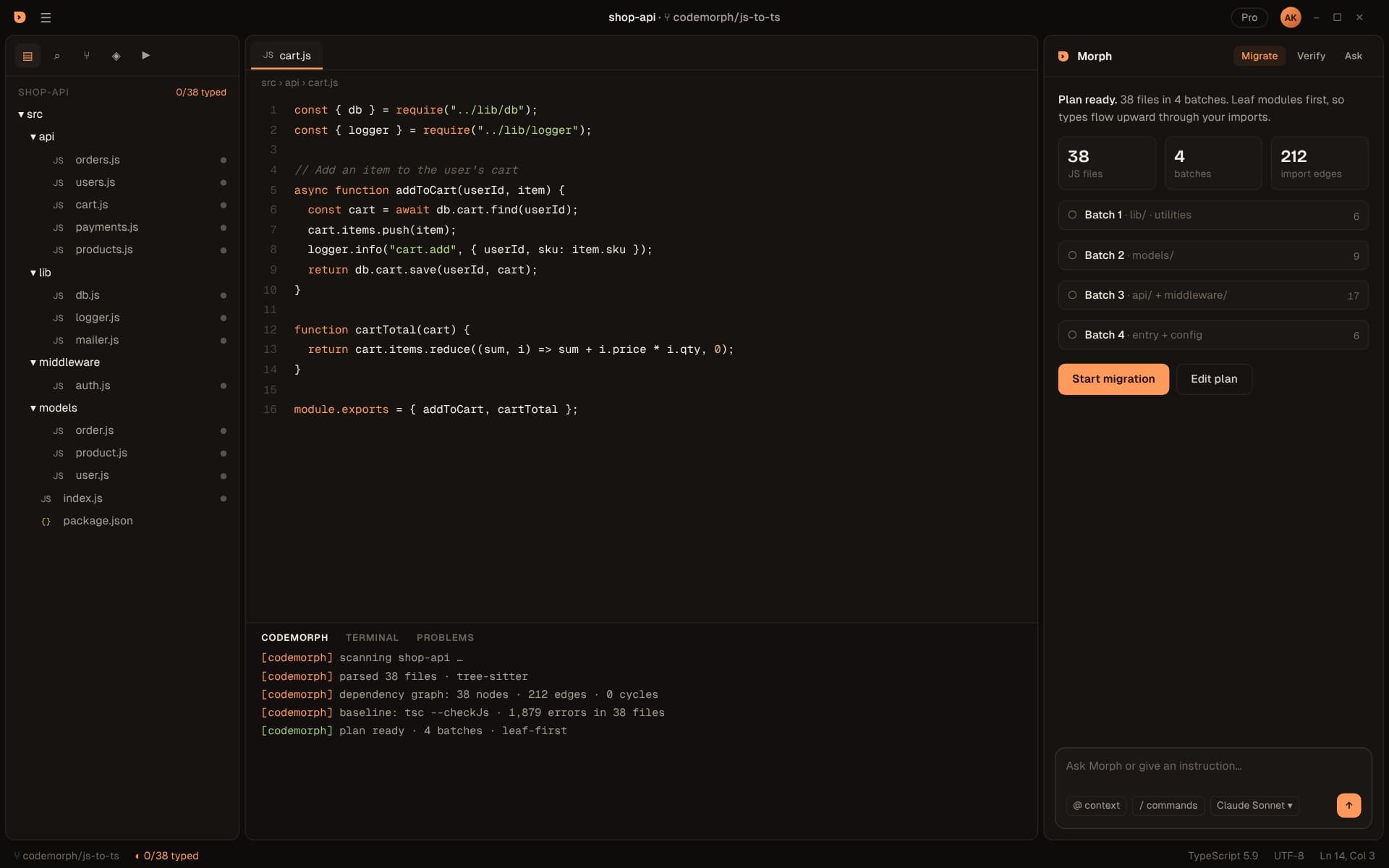
The Morph panel shows the file count, the batches named by folder and the number of import edges. Edit the plan or start the migration.
Reading your plan
What the numbers tell you
The plan is useful even before you convert a single file. It's an honest picture of how tangled a codebase is.
JavaScript files
Batches
Import edges
Batch 1
Cycles
Last batch
Step 3 · Convert
Batch conversion
Each file is converted with its already-typed dependencies in context, then checked before the next batch starts.
Typed against real imports
Progress you can see
Repair loop
Resumable
Steering
Tell Morph what you want
Type instructions into the Morph panel in plain words. Use @ to add context and / for commands.
“Migrate the api folder, strict mode, keep tests green”
Limits the run to one part of the plan and holds it to strict type-checking and passing tests.
“Start with lib and utils only”
Runs just the leaf batches so you can review the foundations before going further.
“Prefer interfaces for exported object types”
Sets a style preference that applies to every file in the run.
“Don't change module syntax in config files”
Leaves CommonJS in place where your tooling expects it.
“Why did payments.ts need review?”
Asks about a specific result. Morph answers with the diagnostics and call sites behind it.
The output panel
A log you can actually read
The CODEMORPH panel records every step: the scan, the baseline, each file's tsc result and how many repairs it took.
[codemorph] scanning shop-api …
[codemorph] parsed 38 files · tree-sitter
[codemorph] dependency graph: 38 nodes · 212 edges · 0 cycles
[codemorph] baseline: tsc --checkJs · 1,879 errors in 38 files
[codemorph] plan ready · 4 batches · leaf-first
[codemorph] batch 1/4 · lib/ · utilities
[codemorph] utils/catchAsync.ts · tsc 0 errors · 0 repairs
[codemorph] utils/logger.ts · tsc 0 errors · 1 repairs
[codemorph] batch 2/4 · models/
[codemorph] models/payment.ts · needs review · 2 any
A file marked needs review couldn't be typed cleanly within the repair budget. It waits in review with its diagnostics instead of being forced through with any.
Step 4 · Review
Diff review
Nothing is written to your project without your approval. Tell Morph what you want in plain words, then review the result file by file.
On a branch
Work happens on a migration branch, so your main history stays clean until you merge.
Accept or reject
Every file is marked accepted, in review or queued. Accept moves you straight to the next one.
Explained
Each file comes with a summary, like which types were inferred from how many call sites.
Edge cases
The tricky parts, handled
Circular imports
Barrels and re-export chains
Dynamic import()
Unresolved imports
Very large files
Generated and vendored code
FAQ
Questions about migrating
Does CodeMorph change my files during Scan & Plan?
What about projects that are already partly TypeScript?
How are circular imports handled?
What if an import can't be resolved?
Which frameworks are supported?
How big a project can it handle?
What about monorepos?
Can I change the plan?
Does it convert CommonJS to ES modules?
What if my project already has a tsconfig.json?
Deep dive
Plan your migration in a minute.
Download the beta, open a project and see your migration plan in under a minute.