Skip to content
CodeMorph

Download CodeMorph for Windows (Beta)

Leave your email and the download starts right away. We'll only write about the beta and new releases.

v0.1.0Windows beta now available

Migrate JavaScript to TypeScript. Verified.

CodeMorph is the AI code editor that converts your codebase file by file, leaf modules first, and type-checks every file.

Download CodeMorph for Windows (Beta)

Leave your email and the download starts right away. We'll only write about the beta and new releases.

Windows 10/11 · Free during beta · Bring your own Claude key or use Ollama

Windows may show 'unknown publisher'. Click More info, then Run anyway.

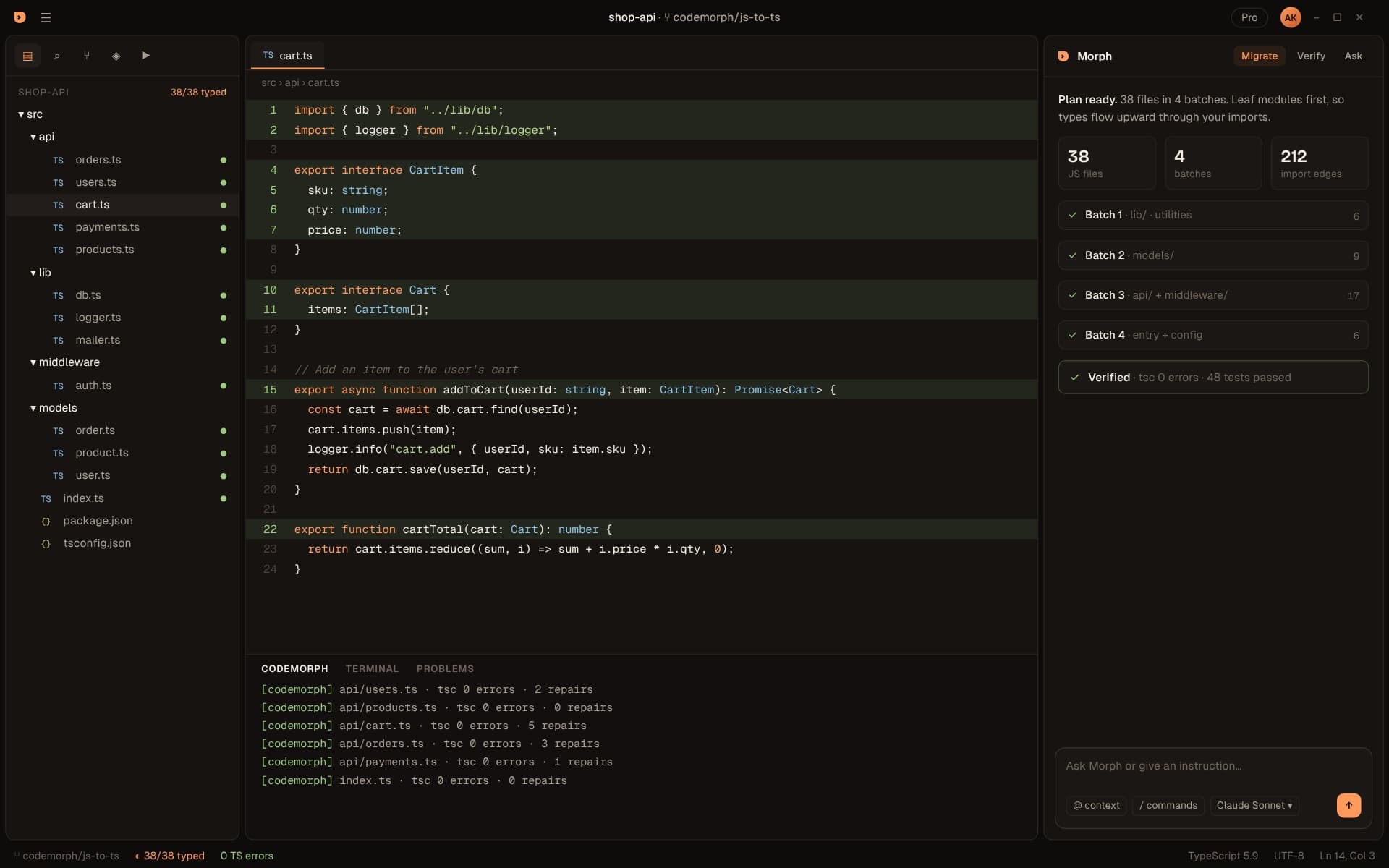
Batch migration ending in a verified run
Preview

A complete editor

Everything you expect from your editor. Plus a migration engine.

CodeMorph is a full desktop editor with the keybindings, layout and extensions developers already know. The difference is Morph: a migration engine that understands how your files depend on each other.

Capabilities

01Scan & Plan

See the whole migration before a single file changes.

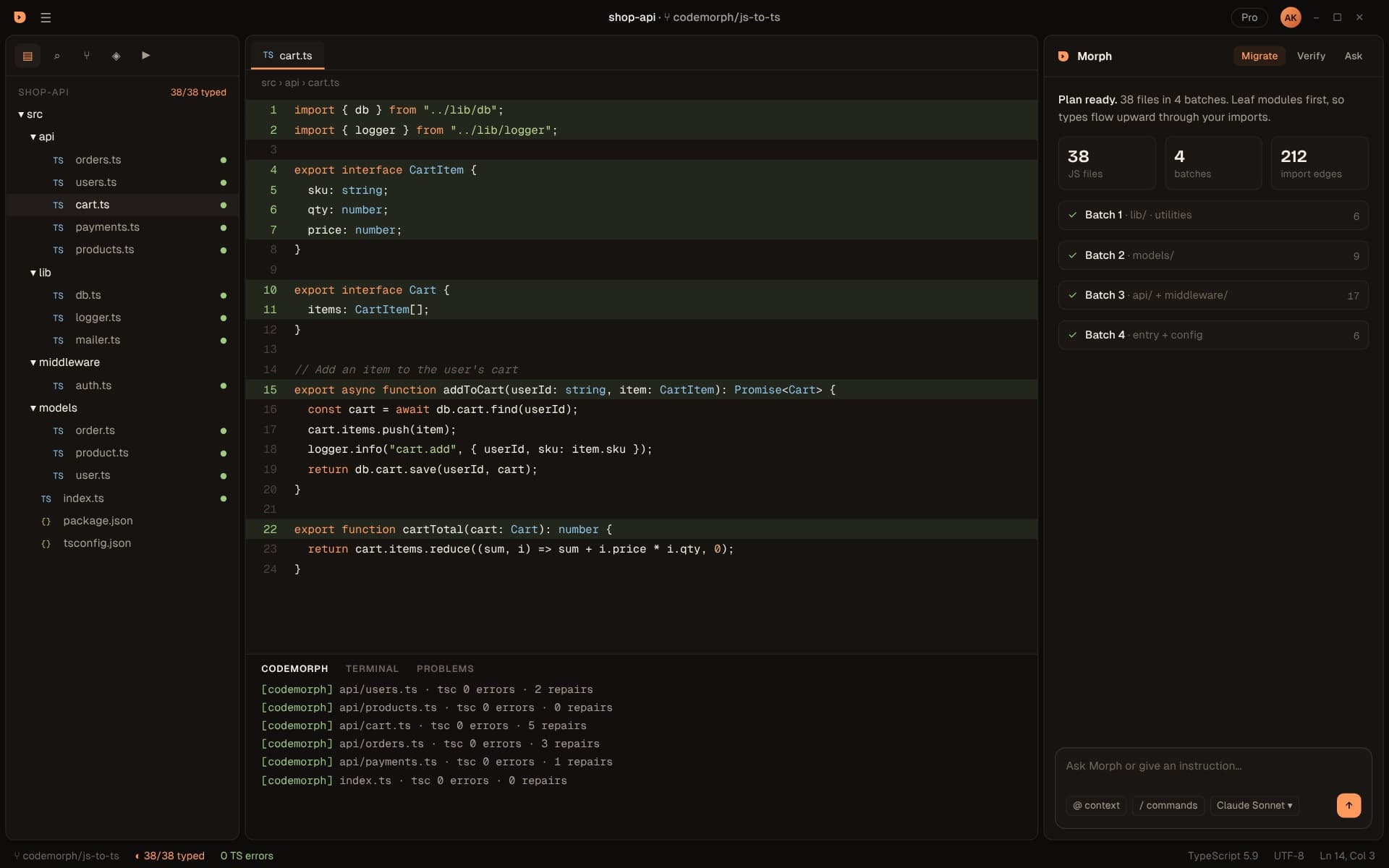
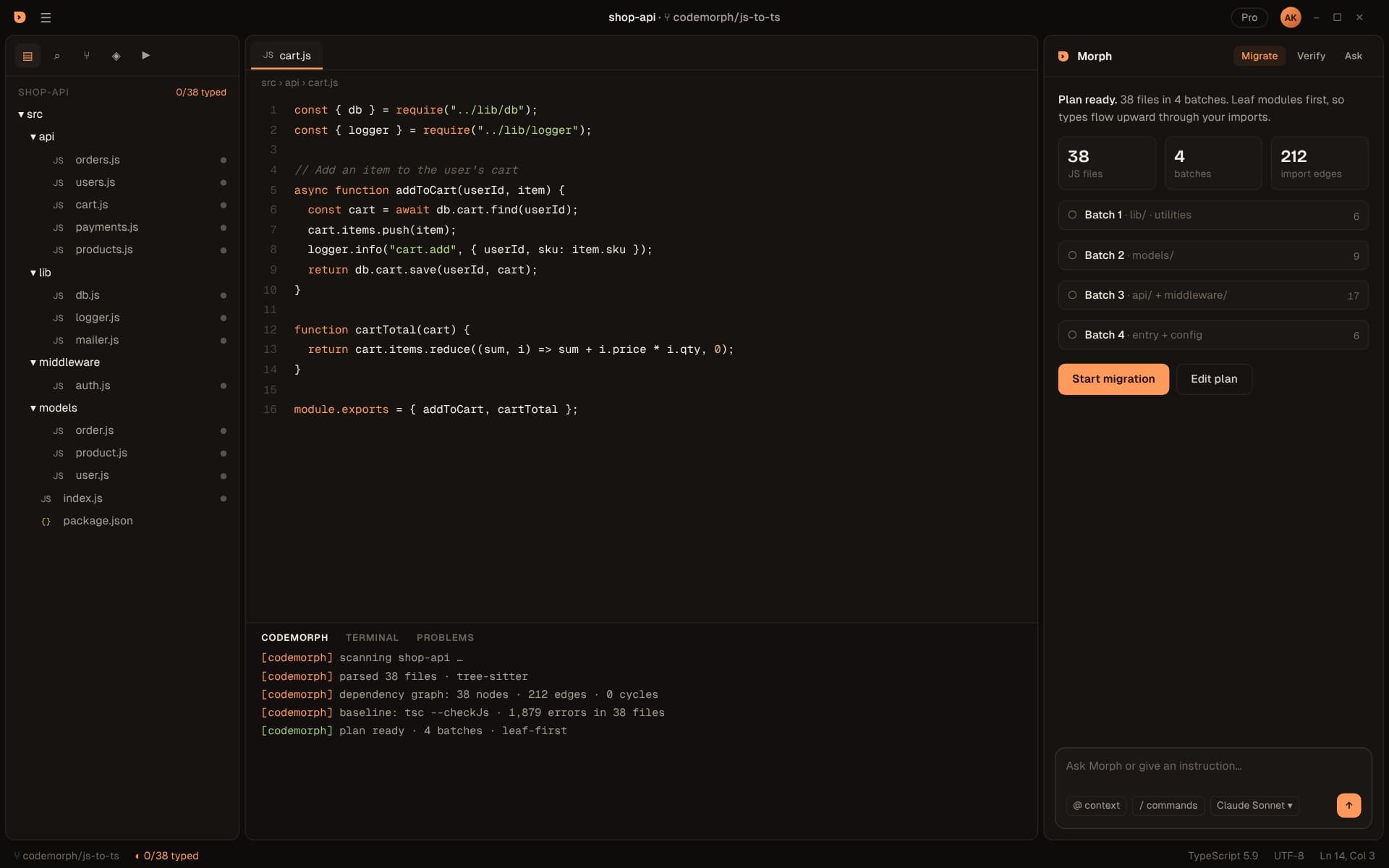
CodeMorph parses every file, resolves every import and builds a dependency graph of your project. Then it orders the work: leaf modules first, so types flow upward through your imports.

  • ESM and CommonJS parsed with tree-sitter, including re-exports and dynamic imports
  • tsconfig and jsconfig path aliases, barrels and index files resolved
  • Circular imports grouped so they migrate together
02Batch migration

Converted in batches, each one typed against the last.

Each batch is converted against imports that are already TypeScript, so the model infers real types from real call sites instead of guessing. The explorer shows progress file by file.

  • Grey, orange, green: every file's state in the explorer
  • Live log of each file, its tsc result and any repairs
  • Stop, resume or re-run any batch
03Diff review

Every change lands as a diff you approve.

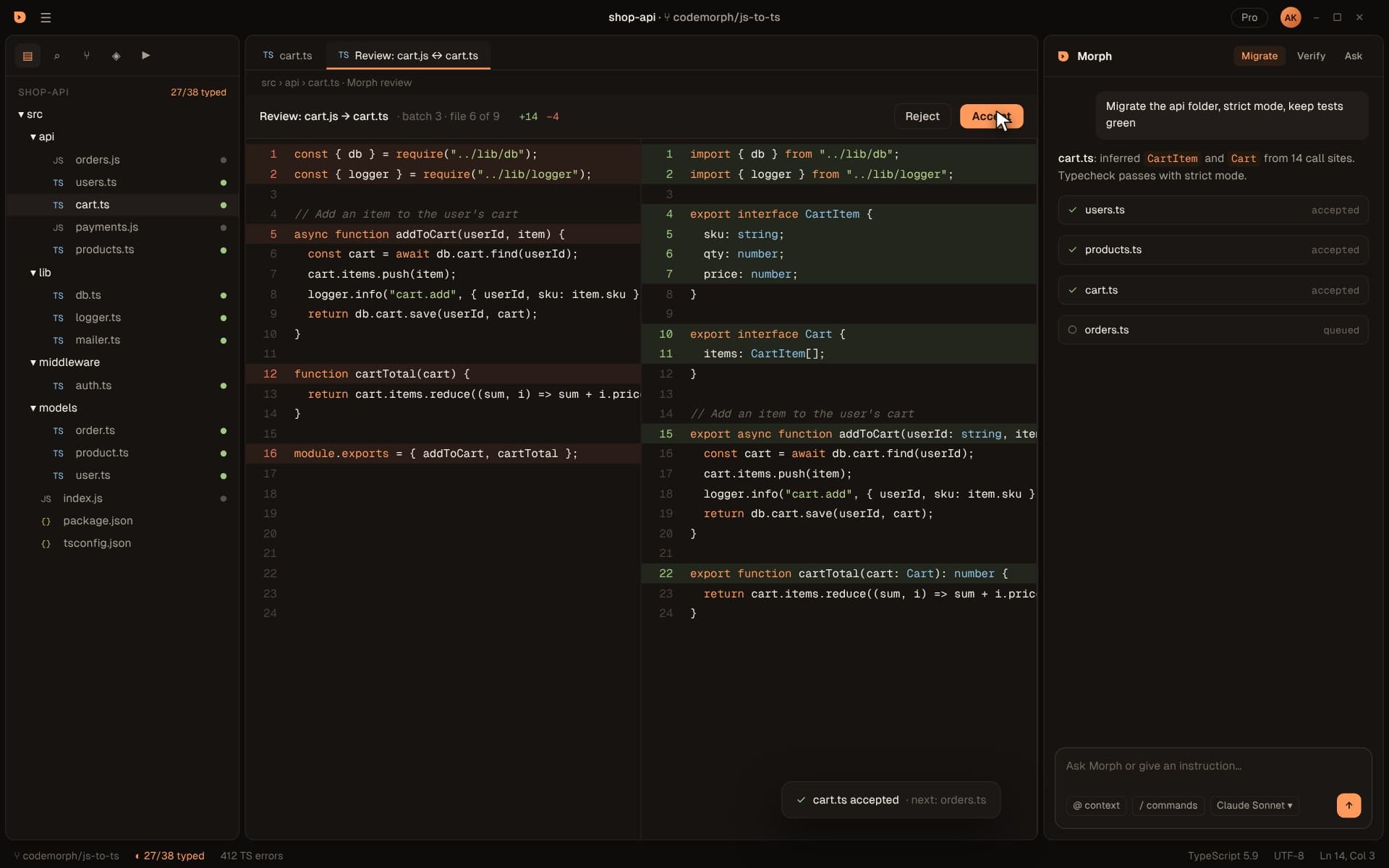
Review every converted file side by side before you keep it. CodeMorph saves a checkpoint before any change, so one click on Undo all restores your project byte for byte.

  • Side-by-side JavaScript to TypeScript diffs
  • Review one file at a time
  • A checkpoint before any change, and one-click Undo all
04Run & Verify

Not just converted. Type-checked.

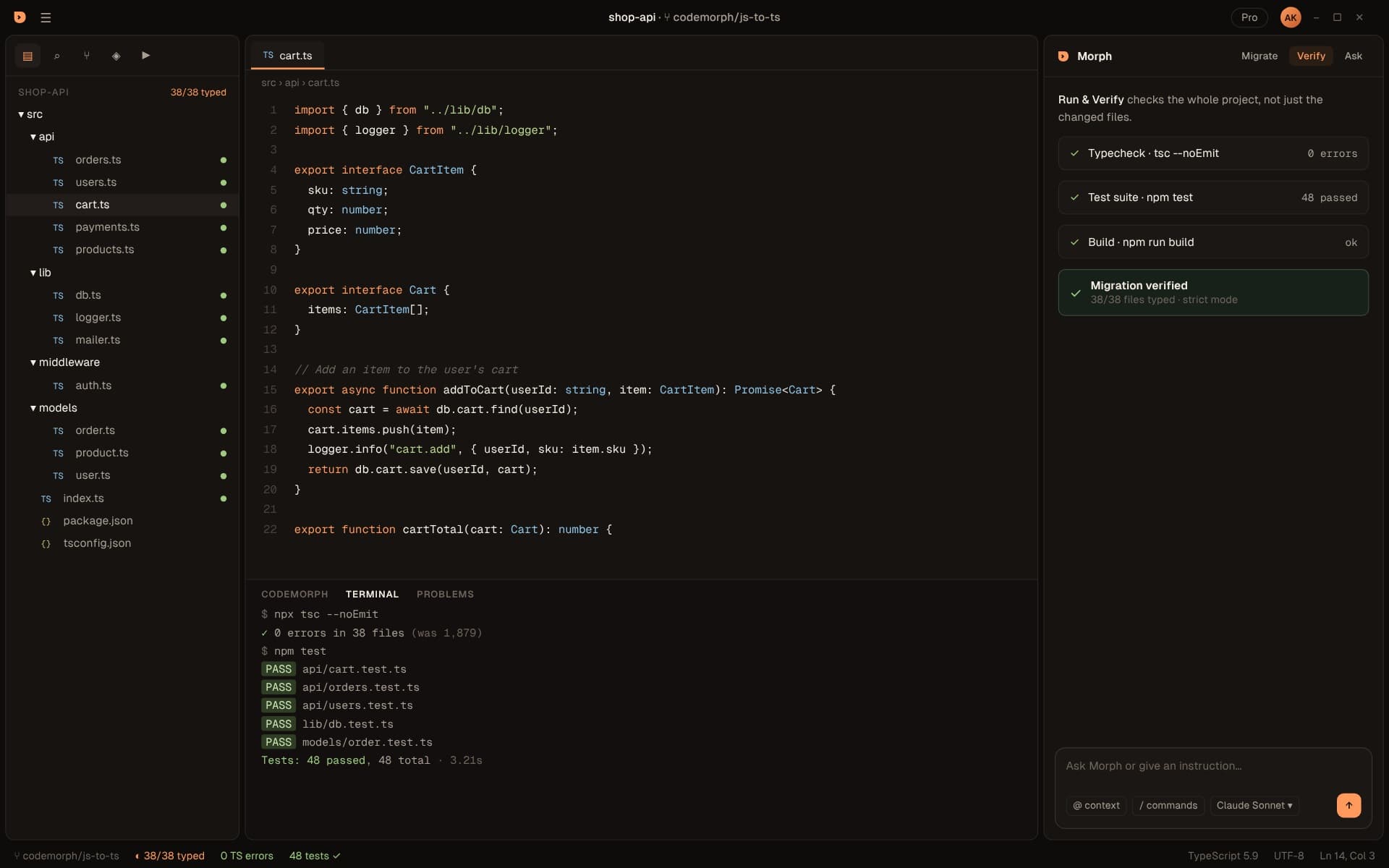
After every batch CodeMorph runs tsc across the whole project. Errors go back into a repair loop with the compiler output attached, and a batch is only marked verified when there are zero type errors. Running your tests is coming soon.

  • tsc --noEmit against your real tsconfig
  • Verified means zero type errors
  • Running your Jest or Vitest suite: coming soon
Preview
05Morph agent Coming soon

Ask why. Get call sites, not guesses.

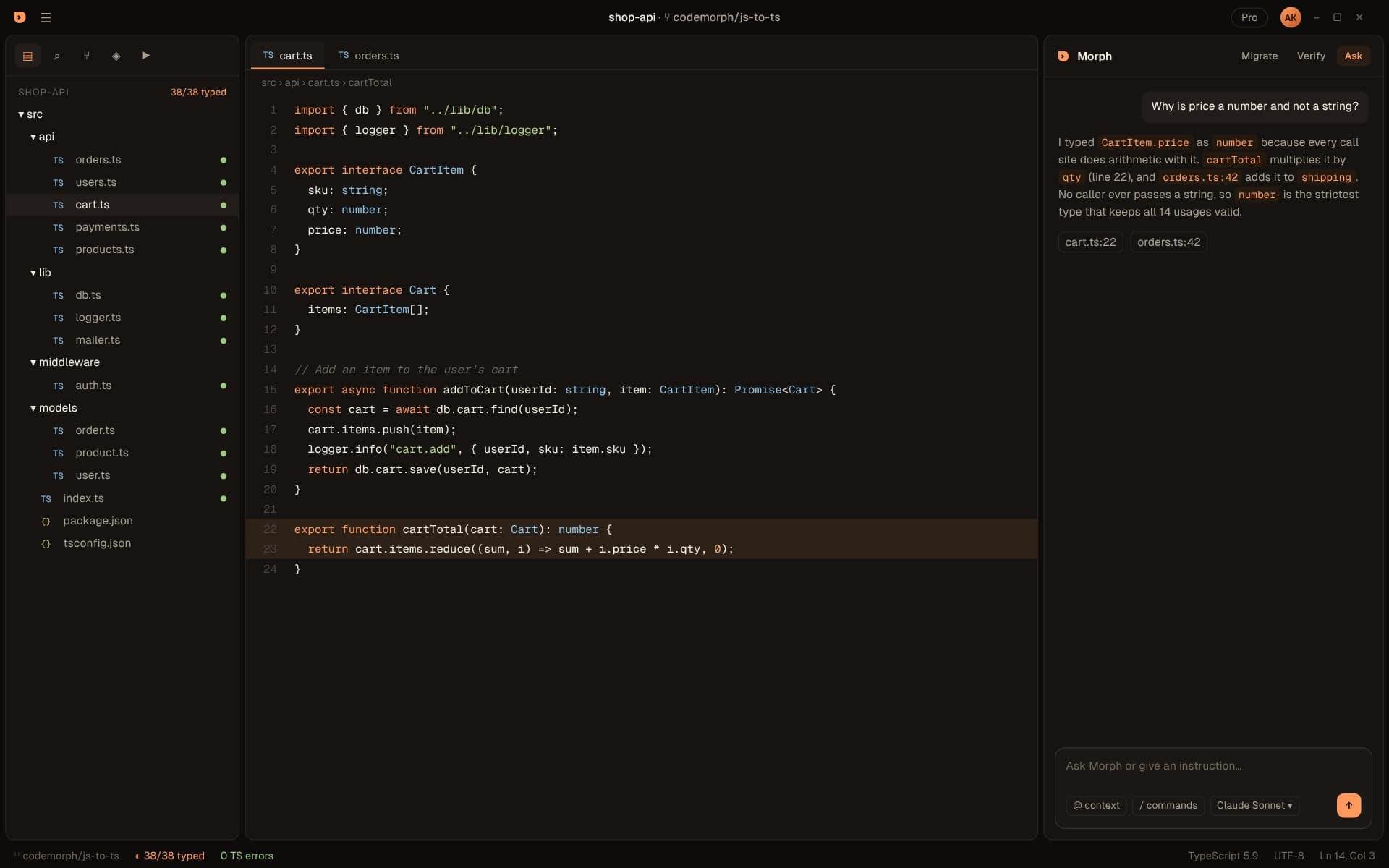
Morph lives in the side panel with your dependency graph as context. Ask why a type was chosen, tighten an any, or request a change, and it answers with the files and lines that justify it.

  • Answers grounded in the graph and real call sites
  • Bring your own Anthropic key, or run local models with Ollama
  • Opens with Ctrl+L, like the editor you already use
Preview

End to end

How a migration runs

Seven steps from an open folder to verified TypeScript. Each one produces something you can inspect before the next begins.

  1. 01

    Open your project

    Ctrl+L opens Morph
    Open the folder that contains package.json and trust the workspace. The Morph panel opens on the right with Migrate and Verify tabs. Ask is coming soon.
  2. 02

    Scan

    seconds, fully local
    Every .js, .jsx, .mjs, .cjs, .ts and .tsx file is parsed with tree-sitter. Each import is resolved and classified as a local file, a package, a Node built-in, an asset or unresolved.
  3. 03

    Plan

    leaf-first batches
    Files are ordered with Tarjan's algorithm so dependencies always come first, circular groups stay together, and the work is packed into batches named by folder.
  4. 04

    Measure the baseline

    tsc --checkJs
    CodeMorph counts the type errors your JavaScript already has, so progress is measured against reality rather than a guess.
  5. 05

    Convert batch by batch

    your Anthropic key or Ollama
    Each file is converted with its already-typed dependencies in context. Compiler errors go back into a bounded repair loop with the exact diagnostics attached.
  6. 06

    Review every file

    file by file
    Each file arrives as a side-by-side diff with a short summary of what was inferred and why. A checkpoint was saved first, so Undo all can put everything back.
  7. 07

    Verify

    type-check
    Run & Verify type-checks the whole project with tsc. When it's clean, you'll see Migration verified. Running your tests and build is coming soon.

Before and after

Real types, from real usage

CodeMorph types each file against modules that are already TypeScript, so shapes come from the code itself instead of guesses. Logic stays exactly the same.

Before · orders.js
// src/api/orders.js
const { db } = require("../lib/db");
const { money } = require("../utils/money");

async function placeOrder(userId, cart) {
  const total = cart.items.reduce((sum, i) => sum + i.price * i.qty, 0);
  const order = await db.orders.create({ userId, total, items: cart.items });
  return { ...order, display: money(total) };
}

module.exports = { placeOrder };
After · orders.ts
// src/api/orders.ts
import { db } from "../lib/db";
import { money } from "../utils/money";
import type { Cart } from "../models/cart";
import type { Order } from "../models/order";

export interface PlacedOrder extends Order {
  display: string;
}

export async function placeOrder(userId: string, cart: Cart): Promise<PlacedOrder> {
  const total = cart.items.reduce((sum, i) => sum + i.price * i.qty, 0);
  const order = await db.orders.create({ userId, total, items: cart.items });
  return { ...order, display: money(total) };
}

Why leaf-first

Types flow upward. So does the migration.

Migrating a file before its dependencies forces the model to guess at shapes it can't see. CodeMorph converts files in topological order, so every file is typed against imports that are already TypeScript and already verified.

Leaf-first migration orderTwelve files in four batches. Batch 1 holds leaf modules in lib and utils, batch 2 the models that import them, batch 3 the API routes and middleware, and batch 4 the entry point. Each batch turns orange while it converts and green once verified.Batch 1 · leavesBatch 2Batch 3Batch 4 · entrylib/db.jslib/db.tslib/logger.jslib/logger.tslib/mailer.jslib/mailer.tsutils/money.jsutils/money.tsmodels/user.jsmodels/user.tsmodels/product.jsmodels/product.tsmodels/order.jsmodels/order.tsmiddleware/auth.jsmiddleware/auth.tsapi/users.jsapi/users.tsapi/cart.jsapi/cart.tsapi/orders.jsapi/orders.tsindex.jsindex.ts
JavaScript, not yet migrated Converting TypeScript, verifiedIllustrative project. Scan & Plan computes this order for your code today.

Compared with the usual approaches

Why migrations stall, and how CodeMorph is different

Every approach can produce TypeScript. The difference is whether you can trust the result without re-reading every line.

CapabilityBy handRename and suppressAI chat, file by fileCodeMorph
Converts in dependency orderNoNoNoYes
Keeps circular imports togetherNoNoNoYes
Types inferred from real call sitesBy handNoPartlyYes
Type-checks the whole project after each stepBy handNoNoYes
Runs your tests and buildBy handNoNoComing soon
Every change reviewed as a diffYesNoCopy and pasteYes
Avoids blanket any and ts-ignoreYesNoSometimesYes
Code goes only to the AI provider you chooseYesYesDepends on the toolYes
Weeks of engineer timeYesLessLessLeast

"Rename and suppress" means renaming files to .ts and silencing errors with any or ts-ignore, by hand or with a codemod.

Who it's for

Built for the codebases that never got typed

Teams with a legacy Node API

An Express or Fastify backend that grew for years without types. CodeMorph types the data layer first, then models, then routes, and type-checks the whole API at every step.

React and Next.js apps

JSX components become TSX with props inferred from how each component is actually rendered across the app, leaf components first.

Library maintainers

Ship real type definitions generated from typed source instead of hand-written .d.ts files that drift from the code.

Agencies inheriting codebases

Map an unfamiliar project in seconds: what depends on what, where the cycles are, which imports don't resolve, before you touch anything.

Teams adopting strict mode

Already on TypeScript but loose? Turn on strict mode and migrate file by file to that bar with every step type-checked.

Engineering leaders

Turn a migration nobody owns into a plan with batches, progress and a definition of done the whole team can see.

Works with your stack

The JavaScript you actually ship.

Front end, back end and tests. If it's JavaScript or JSX, CodeMorph can graph it.

  • React
  • Node.js
  • Express
  • Next.js
  • Vite
  • Jest
  • Vitest
  • ESM and CommonJS, JSX, path aliases

Your code stays yours

Your code goes only to the AI provider you choose. Nothing passes through our servers.

Scanning stays local

Scanning, graph building and planning run on your machine, and the graph is a local SQLite file. No code leaves your machine until you convert a file.

Bring your own key

Conversion uses your own Anthropic key, stored in the OS keychain. Or point CodeMorph at Ollama, and the model runs on your own machine.

No telemetry

Telemetry and crash reporting are off by default in the build itself. Nothing phones home.

Open ecosystem

Thousands of extensions install in one click from Open VSX, the open extension registry.

How CodeMorph handles your code

Frequently asked questions

What exactly does CodeMorph do?
It's a desktop code editor with a migration engine built in. It maps how every file in your JavaScript project depends on every other file, converts files to TypeScript in that order, shows every change as a diff for you to accept, and type-checks the whole project after each batch.
Will it change my code without asking?
No. Scanning only reads files. CodeMorph saves a checkpoint before any change, every converted file is reviewed one file at a time, and one-click Undo all restores your project byte for byte.
How does CodeMorph know the migration worked?
Run & Verify runs tsc --noEmit across the whole project. A migration is verified only when there are zero type errors. Running your tests and build is coming soon.
Does my code get uploaded anywhere?
Your code goes only to the AI provider you choose. Nothing passes through our servers. Scanning, planning, review and verification run on your machine; conversion sends code straight from your machine to the provider you configure, under your own account. With Ollama, the model runs on your own machine.
Which AI model does it use?
Claude models from Anthropic, using your own API key, or a local model through Ollama, which is available now. You choose the provider in settings.
What kinds of projects work?
JavaScript and JSX projects with a package.json: React, Next.js, Vite, Node and Express apps, libraries, and test suites in Jest or Vitest. ES modules, CommonJS and mixed JavaScript and TypeScript projects are all supported.
How long does a migration take?
Scan & Plan takes seconds on most projects. Conversion time depends on project size and your model, and you review as you go, batch by batch, instead of facing one giant diff at the end.
What does it cost?
Nothing during the beta. Paid plans arrive at launch, the editor and Scan & Plan stay free, and model usage is always billed by your own provider.
Which platforms are supported?
Windows 10 and 11 (x64) in the beta. macOS and Linux builds are planned; you can join the waitlist on the download page.

Your codebase, typed. And proven.

Download the beta, open a project and see your migration plan in under a minute.

Download CodeMorph for Windows (Beta)

Leave your email and the download starts right away. We'll only write about the beta and new releases.

Read the docs

Windows 10/11 · Free during beta · Bring your own Claude key or use Ollama

Windows may show 'unknown publisher'. Click More info, then Run anyway.