Morph agent
An agent that can cite its reasons.
Morph lives in the side panel with your whole dependency graph as context. Ask why a type was chosen, tighten an any, or request a change, and it answers with the files and lines that justify it.
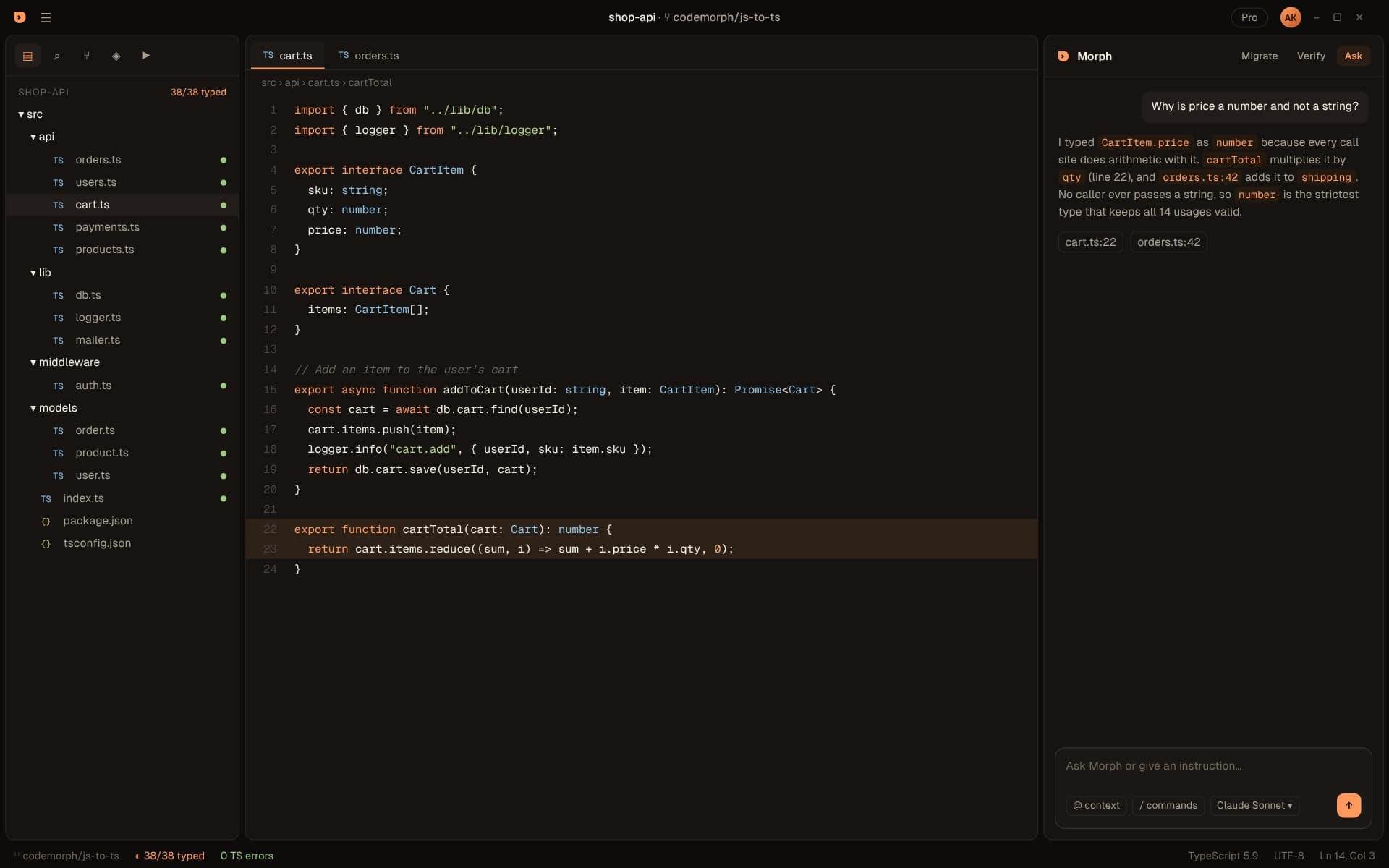
Ask
Grounded in your code
Morph doesn't guess from one open file. It reads the graph.
Graph-aware context
Answers with evidence
Instructions, not just questions
Migration-native
The panel
A tour of Morph
Morph lives in the secondary sidebar on the right. Ctrl+L opens it from anywhere.
| Migrate tab | Scan & Plan, the batch list with progress, and the review queue for the current run. |
|---|---|
| Verify tab | Run & Verify: typecheck, test suite and build, with each step's result. |
| Ask tab | Questions about your migration. Morph knows every change it made and why. |
| Instruction box | At the bottom of the panel: give instructions or ask questions in plain words. |
| @ context | Point Morph at specific files, folders or symbols to include. |
| / commands | Quick actions, such as starting a migration or running Verify. |
| Model picker | Choose which Claude model handles the conversation and conversion. |
Examples
Things worth asking
Morph is at its best on questions about your own code and the changes it made.
“Why is price a number and not a string?”
Answers with the call sites that do arithmetic on it, such as cartTotal multiplying by qty.
“Which files still have any?”
Lists the files in review and the diagnostics that kept them from typing cleanly.
“What imports models/user?”
Uses the dependency graph to show every importer, so you know the blast radius of a change.
“Why did orders.ts need two repairs?”
Shows the compiler errors from each attempt and how they were fixed.
“Make CartItem.sku a branded type”
An instruction: Morph proposes the change as a diff and re-checks the files that use it.
“Is it safe to convert config/ to ESM?”
Looks at how those files are loaded and flags the ones your tools require as CommonJS.
Context
How Morph decides what to read
Good answers come from the right context, not the most context.
- 01
Start from the question
The file, symbol or folder you mention, or the one open in the editor. - 02
Walk the graph
Pull in the modules it imports and the files that import it, using the dependency graph from Scan & Plan. - 03
Add the history
The plan, each batch result, the compiler diagnostics and the change Morph made to the file. - 04
Answer with evidence
Point to specific files and lines, so you can check the reasoning yourself.
Bring your own key
Your models. Your bill. Your data path.
CodeMorph doesn't resell tokens or proxy your code through its own servers.
Anthropic
Available nowPaste your key with CodeMorph: Set API Key, pick a Claude model in the Morph panel, and you're ready.
Ollama
Coming soonRun open models on your own machine. Nothing leaves your network, ideal for code you can't send to any third party.
Stored in the OS keychain
Direct to your provider
{
  // Which provider Morph uses: "anthropic" or "ollama"
  "codemorph.ai.provider": "anthropic",
  // Model name for that provider, e.g. a Claude model or a local Ollama tag
  "codemorph.ai.model": ""
}
Models and cost
Pay your provider, not a markup
Model usage is billed by Anthropic, on your account, at their prices. CodeMorph doesn't resell tokens or add a margin, and paid CodeMorph plans charge for the product, not for usage.
Pick the model per task in the Morph panel. A larger model is worth it for conversions with tricky inference; a faster one is plenty for quick questions. Your choice is saved in codemorph.ai.model.
What's sent
Exactly what leaves your machine
| Action | Sent to your provider |
|---|---|
| Scan & Plan | Nothing. Fully local. |
| Run & Verify | Nothing. Fully local. |
| Converting a file | The file, the typed dependencies it imports and any compiler diagnostics for repairs. |
| Asking a question | Your question and the relevant files, graph context and change history. |
| Usage analytics | Nothing. Telemetry is disabled. |
Requests go directly from the editor to your provider. See Data use for the full picture.
Fits your hands
Opens where you expect it
Open the Morph panel
Start a migration scan
Run & Verify
On macOS, Cmd replaces Ctrl.
Can I use Morph without an API key?
Which Claude model does Morph use?
Does CodeMorph train on my code?
Can Morph edit files directly?
Does Morph remember previous conversations?
Can I use Morph for things other than migration?
When is Ollama support coming?
Ask Morph about your code.
Download the beta, open a project and see your migration plan in under a minute.