Review
Every change, a diff you approve.
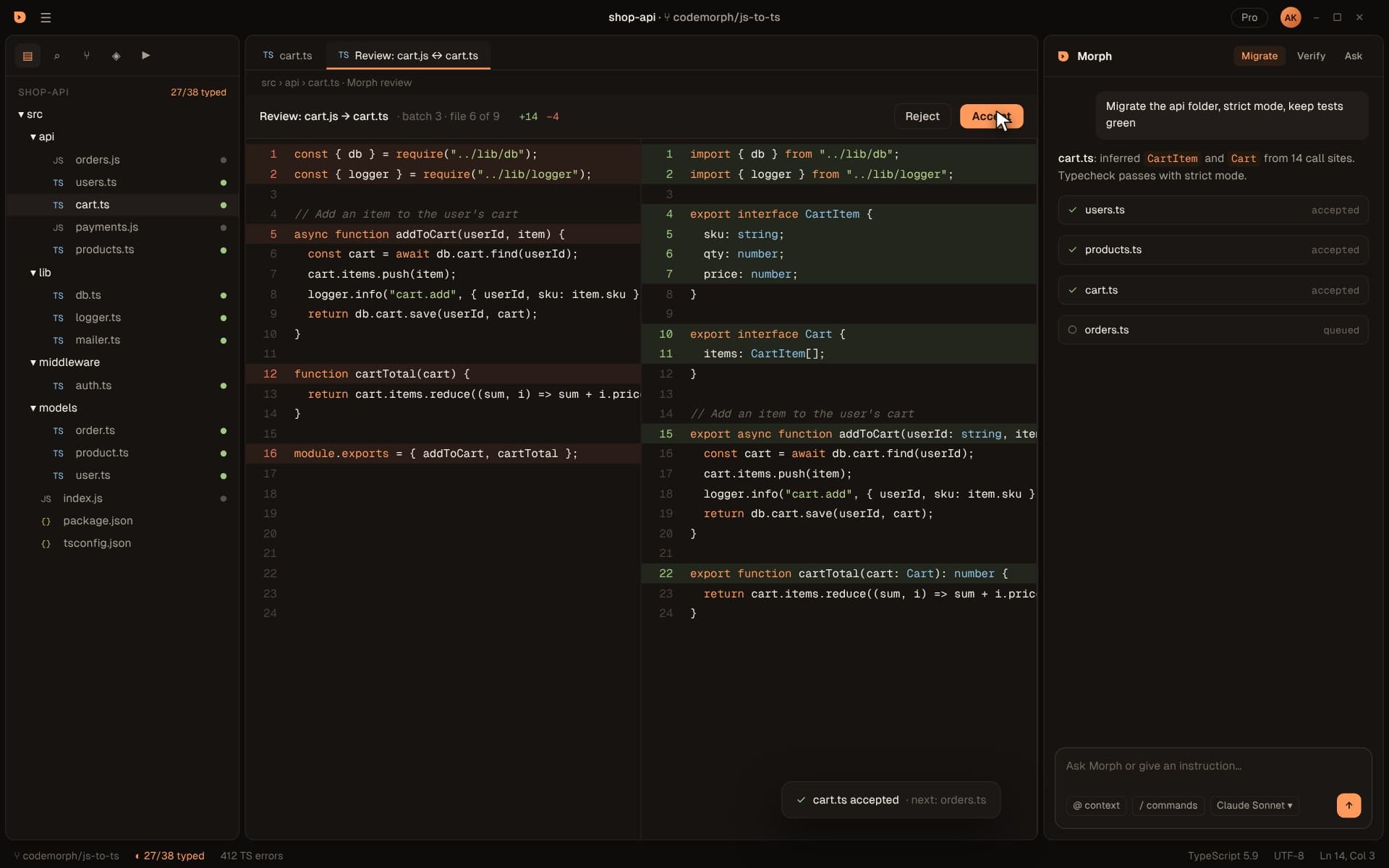
CodeMorph never writes to your project behind your back. Each converted file arrives as a side-by-side diff with a short explanation of what changed and why. You accept it, reject it, or ask Morph before you decide.
The loop
Review at the speed of the migration
Files arrive in plan order, so you review utilities before the models that use them, and every decision informs the next.
- 01
Open the diff
Your JavaScript on the left, the TypeScript on the right, with additions highlighted. - 02
Read the summary
from MorphFor example: cart.ts inferred CartItem and Cart from 14 call sites. Typecheck passes with strict mode. - 03
Accept or reject
Accept keeps the file and moves you to the next one. Reject restores the original. - 04
Verify the whole
Ctrl+Shift+VRun typecheck, tests and build across the project before you commit.
What a good diff looks like
Boring, on purpose
Types added from real usage, module syntax modernized where it's safe, and no logic changes.
// cart.js
const { db } = require("../lib/db");

async function addToCart(userId, item) {
  const cart = await db.cart.find(userId);
  cart.items.push(item);
  return db.cart.save(userId, cart);
}

module.exports = { addToCart };// cart.ts
import { db } from "../lib/db";
export interface CartItem { sku: string; qty: number; price: number }
export interface Cart { items: CartItem[] }
export async function addToCart(userId: string, item: CartItem): Promise<Cart> {
const cart = await db.cart.find(userId);
cart.items.push(item);
return db.cart.save(userId, cart);
}Details
Built for careful engineers
File states
On a branch
Ask before you accept
Reject is free
No hidden any
Normal changes
Anatomy
What's on the review screen
Everything you need to make a decision, without leaving the editor.
| Diff header | The file pair being reviewed, for example cart.js to cart.ts, its position in the batch and the lines added and removed. |
|---|---|
| Accept and Reject | Top right of the diff. Accept keeps the TypeScript; Reject restores the original JavaScript. |
| Side-by-side view | Original on the left, converted on the right, with added and changed lines highlighted. |
| Instruction | The instruction that started the run, pinned at the top of the Morph panel, such as strict mode or one folder. |
| Summary | What Morph inferred for this file and from how many call sites, and whether typecheck passes. |
| File list | Every file in the run with its state: accepted, review or queued. |
| Confirmation | After you accept, a short note names the file and the next one in line. |
Checklist
What to look for in each diff
Most files take seconds. These are the things worth a second look.
Exported types
Do the new interfaces describe what callers really pass? These types spread to every importer.
Optional fields
A field marked optional means some call site doesn't provide it. Check that's intended, not a bug the types just revealed.
Union types
string | undefined or number | string often point at inconsistent callers worth cleaning up later.
Module syntax
require turned into import is usually right, but config files loaded by tools may need to stay CommonJS.
Unchanged logic
Conversions should only add types and modernize syntax. Any behavioral change is a reason to reject.
Remaining any
Files in review list their remaining diagnostics. Decide whether to type them by hand or ask Morph to try again.
Workflow
From accepted files to a merged pull request
- 01
Accept the batch
Work through each file in the batch until the list shows every file accepted. - 02
Run & Verify
Ctrl+Shift+VTypecheck, tests and build across the whole project. Fix or reject anything that fails. - 03
Commit
Accepted files are ordinary changes. Review them in Source Control and commit with a message like “migrate batch 1: lib and utils”. - 04
Open a pull request
One pull request per batch keeps reviews small. Teammates review the TypeScript like any other change. - 05
Continue up the graph
The next batch is typed against what you just merged, so each pull request builds on verified code.
Rejecting
When to say no
Rejecting is cheap and nothing is lost. Good reasons to reject:
- · The conversion changed behavior, not just types.
- · A type is technically valid but wrong for your domain, for example a string where you have a known set of values.
- · You'd rather restructure the file before typing it, such as splitting a module that does too much.
- · A tool or framework expects this file to stay JavaScript.
After rejecting, give Morph an instruction for another attempt, or type the file yourself. Either way, the rest of the plan carries on.
FAQ
Questions about review
Do I have to review every file?
Can I edit a file before accepting it?
What happens to files I reject?
Can I accept a whole batch at once?
Where do accepted changes go?
Can teammates review the migration?
Does Morph remember why it made each change?
What if I accept something by mistake?
Review your first migration.
Download the beta, open a project and see your migration plan in under a minute.