Review and accept diffs
Every converted file arrives as a side-by-side diff. Accept it, reject it, or ask Morph why before you decide.
CodeMorph's rule is simple: every change is checkpointed, reviewed per file, and reversible. Every converted file becomes a diff, and you decide what stays.
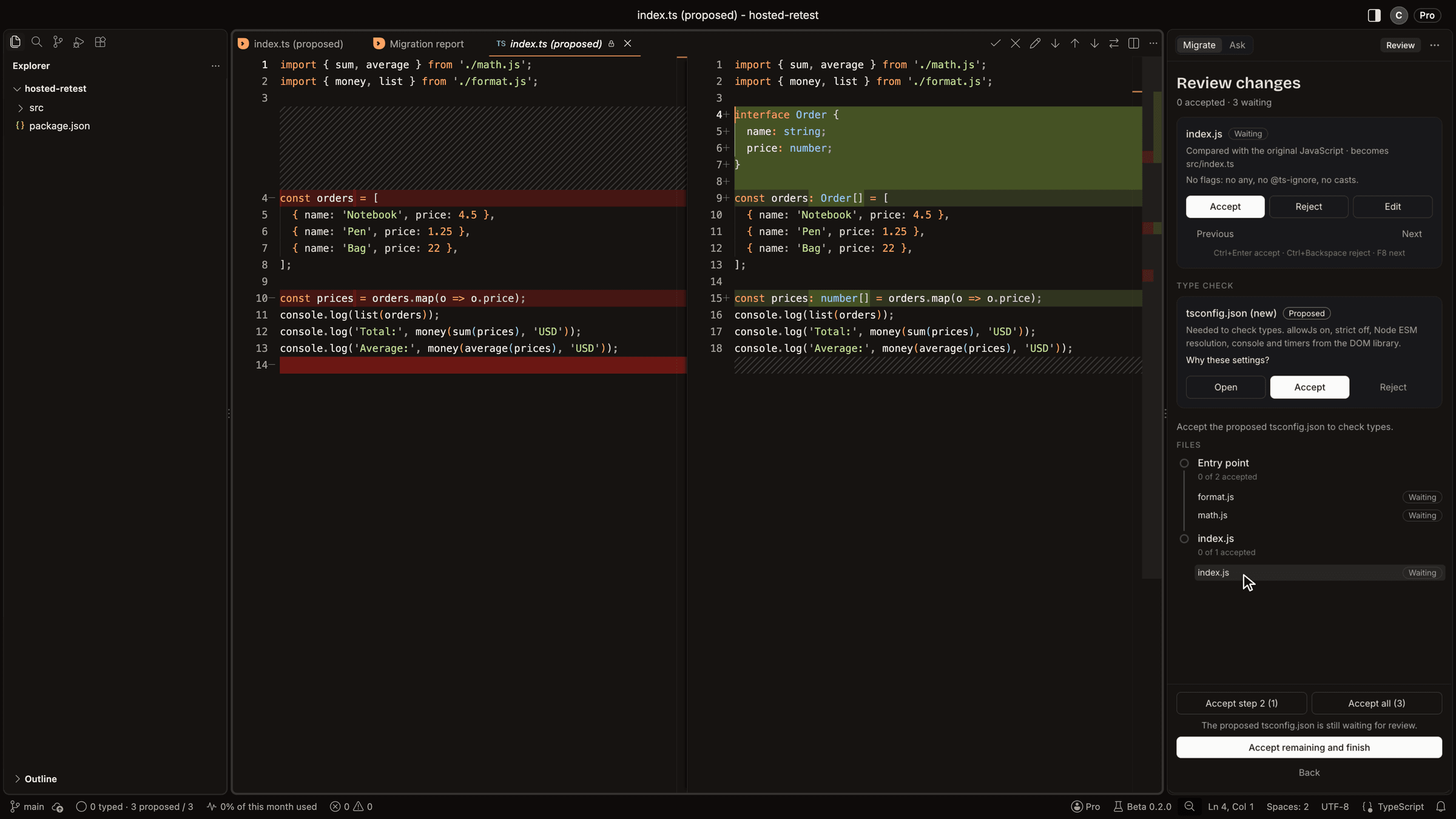
How review works
- A checkpoint comes first. Before any change, CodeMorph saves a checkpoint of your project. One click on Undo all restores it byte for byte.
- Each file opens as a diff. Your JavaScript on the left, the TypeScript on the right, with additions highlighted.
- Morph explains the change. The panel summarizes what it did, for example cart.ts: inferred
CartItemandCartfrom 14 call sites. Typecheck passes with strict mode. - Accept or reject. Accept keeps the file. Reject restores the original. A short confirmation names the file and the next one in line, such as cart.ts accepted · next: orders.ts.
File states
The Morph panel lists every file in the current run with its state:
| State | Meaning |
|---|---|
| accepted | You approved it. The TypeScript version is in your working tree. |
| review | Converted and waiting for your decision. |
| queued | Not converted yet. |
What a good diff looks like
A migration diff should be boring. Expect to see:
.jsrenamed to.ts, or.jsxto.tsx.- Parameter and return types added from real usage.
interfaceortypedeclarations for objects that cross module boundaries.require()andmodule.exportsconverted toimportandexportwhere it's safe.
What you shouldn't see is logic changes. Conversions are meant to preserve behavior exactly, and Verify type-checks the whole project. Running your tests and build is coming soon, so run them yourself.
Ask before you accept
Not sure why a parameter became string | undefined? Open the Ask tab and ask. Morph knows every change it made and why, and answers with the call sites that drove the decision, for example orders.ts:42.
Files that need you
If a file can't pass tsc after a few repair attempts, CodeMorph won't force it through with any. It leaves the file in review with the remaining diagnostics, so you can fix it by hand or ask Morph for help.
Committing
Accepted files are ordinary changes in your working tree. Review them in Source Control (Ctrl Shift G) and commit the way you always do.
Something unclear or out of date? Tell us.